Using Korium well
How your company's knowledge moves
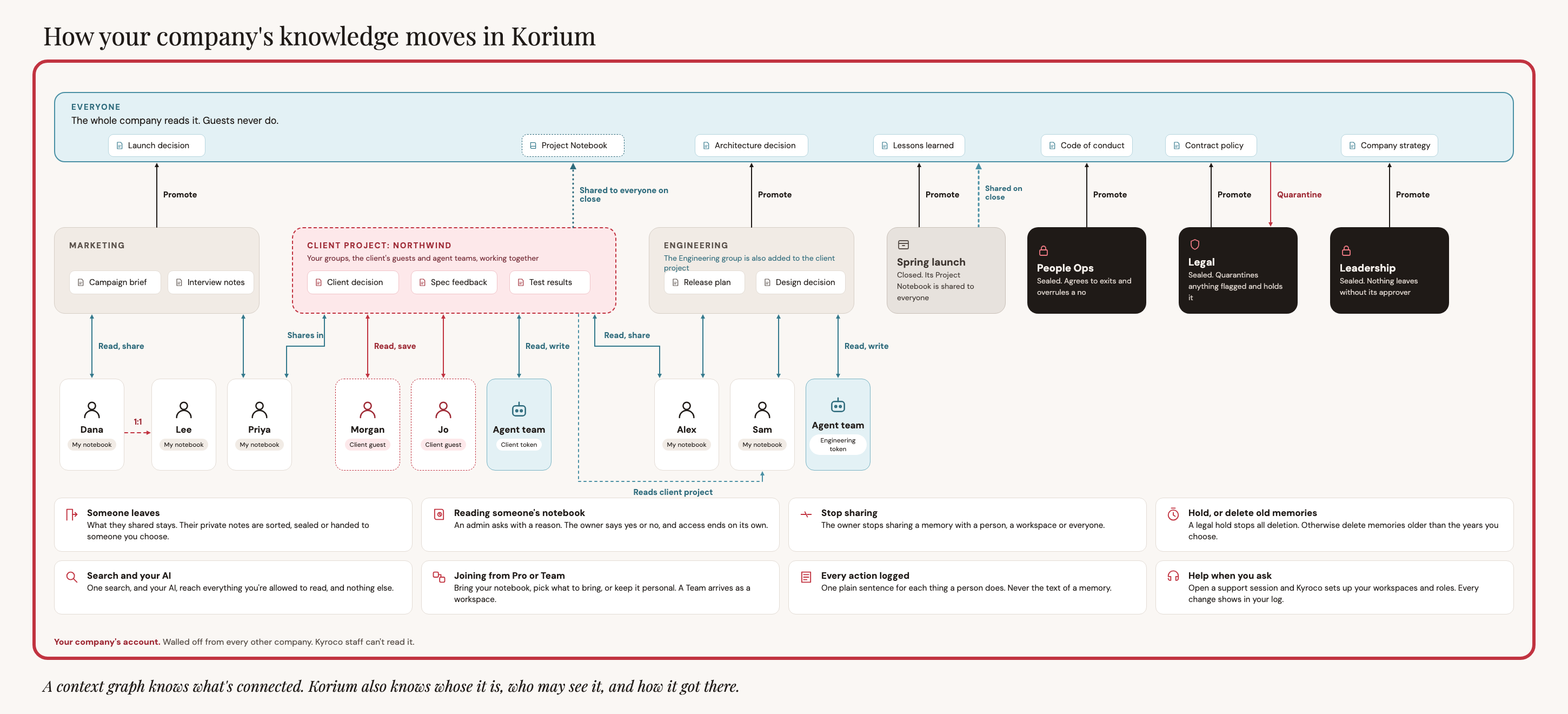
Every memory in Korium starts with one person. It reaches a team when its owner shares it, and it reaches the whole company only when someone approves it. This page walks through that path, then lists what else the picture shows and whether it works today.
The picture
Notebooks: where every memory starts
Each person has a My Notebook. When you save a memory, or when your AI tool saves one for you, it goes into your notebook. Nobody else reads it. A coworker who searches Korium does not find it, count it or see its title.
Your account is one walled-off store. Other companies cannot reach it, and Kyroco staff cannot read it.
What your notebook does for you depends on your plan. On Free and Pro it is your whole store. On Team, every memory is already shared with the team, so there is nothing to choose. On Small Business and Enterprise, you decide what leaves your notebook.
Workspaces: where a team reads together
A workspace is a place where a group of people read and save together, such as Marketing or Engineering. A memory reaches a workspace only when its owner shares it there. Sharing does not move the memory. It stays in the owner's notebook, and the workspace reads it from there.
What a person can do in a workspace depends on their role there: Can read, or Can read and share. A workspace admin runs the workspace, and a Promoter answers requests to send memories to Everyone. An account admin makes the workspaces and chooses who runs each one. See Workspaces for how they work and People and roles for what each role can do.
A person who is not in a workspace does not find its memories, even if they know a word that is in one.
Everyone: what the whole company reads
Everyone is the part of your account that every person in the company can read. Use it for what the whole company should know: a launch decision, a code of conduct, the company strategy.
A memory cannot go from a notebook straight to Everyone. It first has to be shared into a workspace. This keeps one person's private note from reaching the whole company by mistake.
While a memory is in Everyone, its owner cannot edit it.
The eight cards in the picture
The picture ends with eight cards. This table says which ones work today. A card marked "coming" is planned and not built. Do not rely on it. One card works in part, and its row says which part.
| Card | What it says | Today |
|---|---|---|
| Someone leaves | What they shared stays. Their private notes are sorted, sealed or handed to someone you choose. | Coming |
| Reading someone's notebook | An admin asks with a reason. The owner says yes or no, and access ends on its own. | Coming |
| Stop sharing | The owner takes a memory back from a person, a workspace or everyone. | Works today |
| Hold, or delete old memories | A legal hold stops all deletion. Otherwise delete memories older than the years you choose. | Coming |
| Search and your AI | One search, and your AI, reach everything you're allowed to read, and nothing else. | Works today |
| Joining from Pro or Team | Bring your notebook, pick what to bring, or keep it personal. A Team arrives as a workspace. | Partly. When a Team moves up to Small Business, its workspace and its people come along, and so do its memories. Every code index is deleted, and korium-cli builds it again. When a Pro plan moves up, its notebook becomes the owner's notebook in the company. Picking what to bring, or keeping a personal account, is coming. |
| Every action logged | One plain sentence for each thing a person does. Never the text of a memory. | Works today |
| Help when you ask | Open a support session and Kyroco sets up your workspaces and roles. Every change shows in your log. | Coming |
Three other things in the picture are also coming: the dark boxes for sealed groups such as People Ops, Legal and Leadership, the client project that mixes your people with a client's guests and agent teams, and the Project Notebook that a closed workspace shares with everyone.
Search and your AI
One search covers your notebook, what has been shared with you, every workspace you are in, and Everyone. It never returns a memory you may not read. Each result says where the memory lives, and you can narrow a search to one place. Your AI tool, such as Claude or Codex, reads the same set.
Your AI tool saves into your notebook. It can find the requests waiting on you, but it cannot share a memory, promote one or answer a request. Those steps are done on the dashboard by a person, so a wrong guess by an AI tool cannot put a private note in front of the company. Read Working with memory for searching and correcting, and Sharing and access for roles and sign-in scopes.
Use the setup checklist before changing an automated workflow. Check your installed client’s help if its interface differs.